Networking Exposure
Working familiarity with TCP/IP, DNS, DHCP, VPN access, routing, switching, and connectivity troubleshooting.
Job Portfolio
A focused collection of selected technical and creative projects for prospective employers. Use the project tabs to review goals, process notes, screenshots, results, and the skills behind each piece of work.
Resume
Hands-on technical support professional with experience installing, configuring, and troubleshooting systems used in emergency communications, field deployments, and aviation electronics environments. Comfortable working with workstations, network connectivity, telecom-adjacent systems, secure communications equipment, and hardware/software issues that require careful troubleshooting.
Strongest in practical field support, documentation, client coordination, preventative maintenance, and learning unfamiliar systems quickly. Building deeper skills in networking, Windows Server, Active Directory, cloud services, and security tools while bringing steady operational experience from high-pressure, reliability-focused work.
Working familiarity with TCP/IP, DNS, DHCP, VPN access, routing, switching, and connectivity troubleshooting.
Hands-on support exposure with Windows Server environments, Active Directory, Group Policy, and workstation setup.
Basic working knowledge of Microsoft 365, Azure concepts, Fortinet, SonicWall, Cisco, and Meraki environments.
Exposure to VMware, ServiceNow, ConnectWise, Kaseya, incident workflows, and field deployment support processes.
INDIGITAL | Indiana, United States
U.S. Navy | Florida, United States
Featured Work
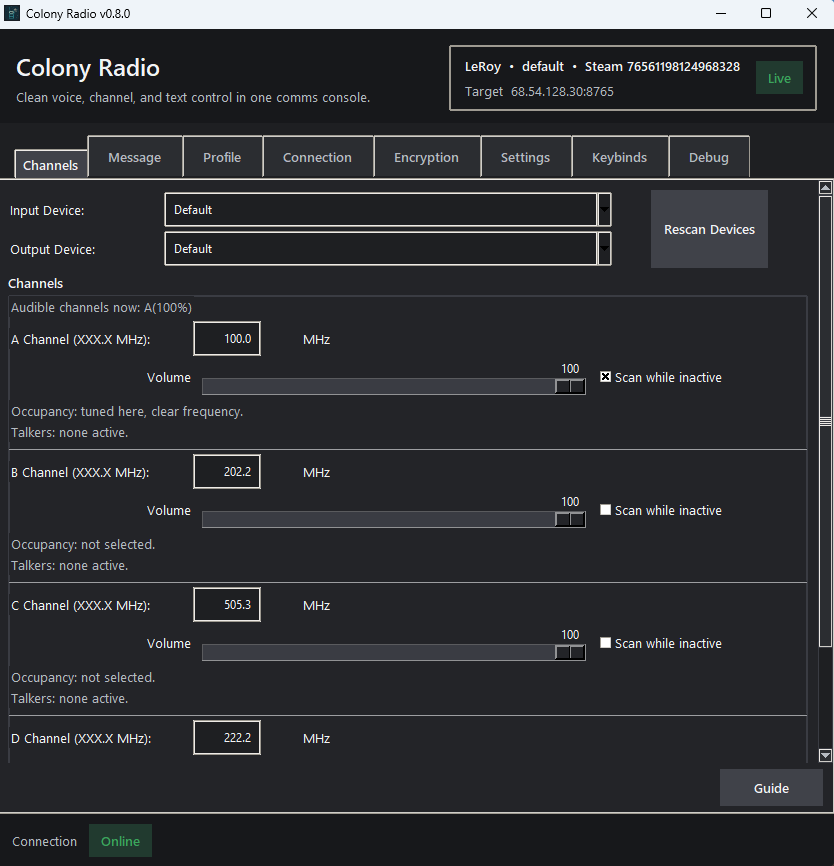
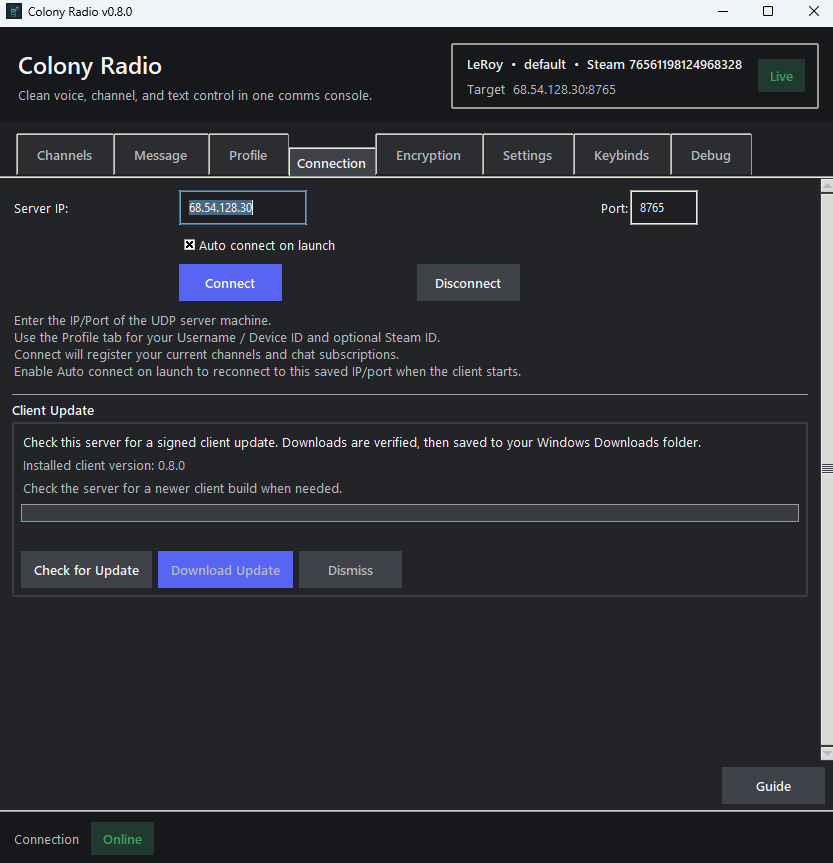
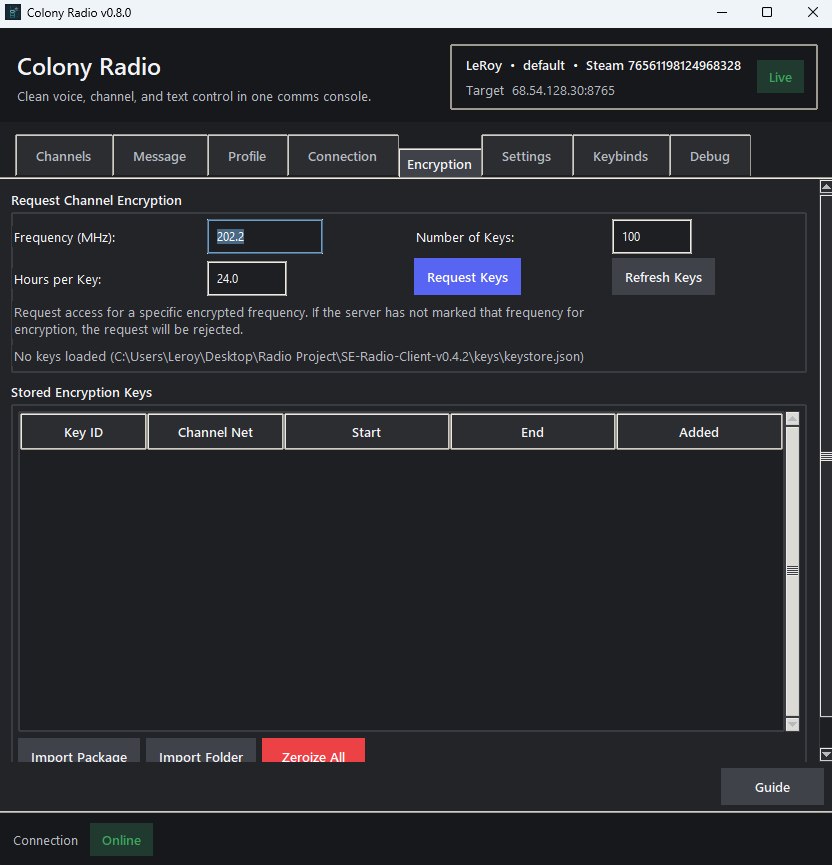
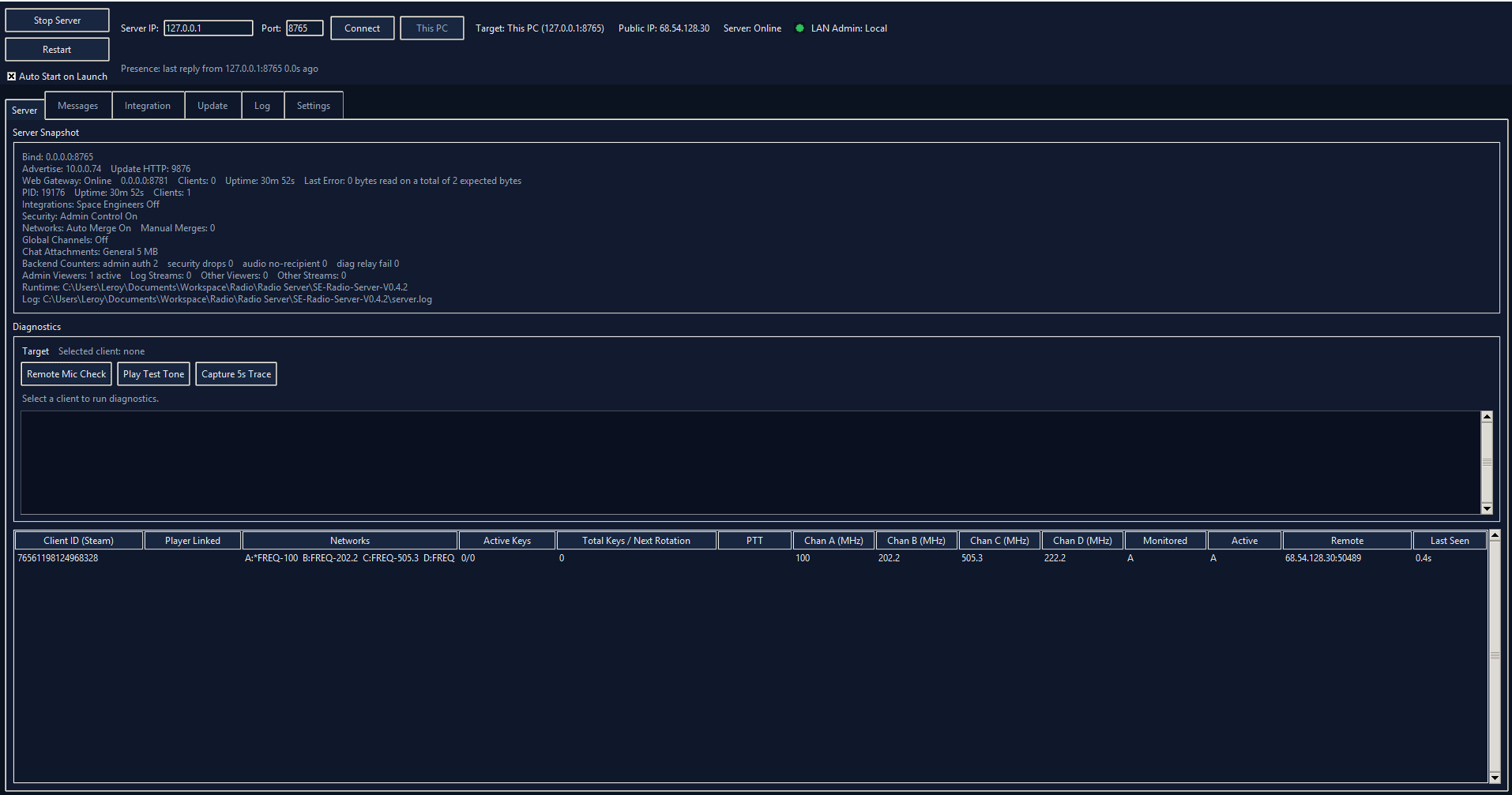
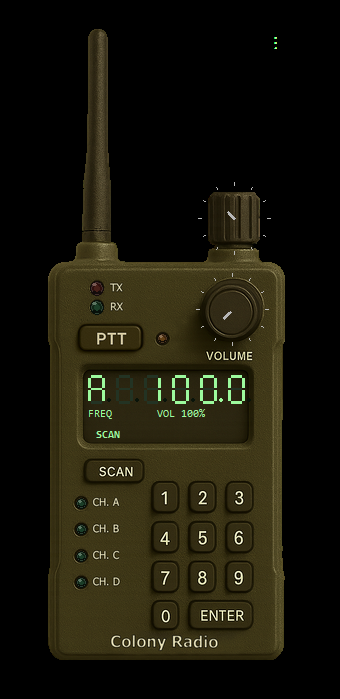
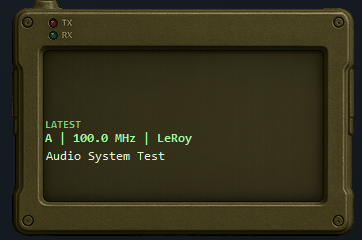
A multi-application radio communication suite built around real-time UDP voice, text chat, server administration, release packaging, and shared regression testing. The project is organized as a Windows desktop client, a unified server/admin tool, an Android prototype, and an umbrella integration project for shared protocol work.
Connects to the radio server for push-to-talk voice, channel scanning, presence, transport health, native frequency chat, overlay chat toasts, and diagnostics.
Handles registration, presence, routing, audio, chat persistence, key delivery, signed admin controls, diagnostics relay, and signed update offers.
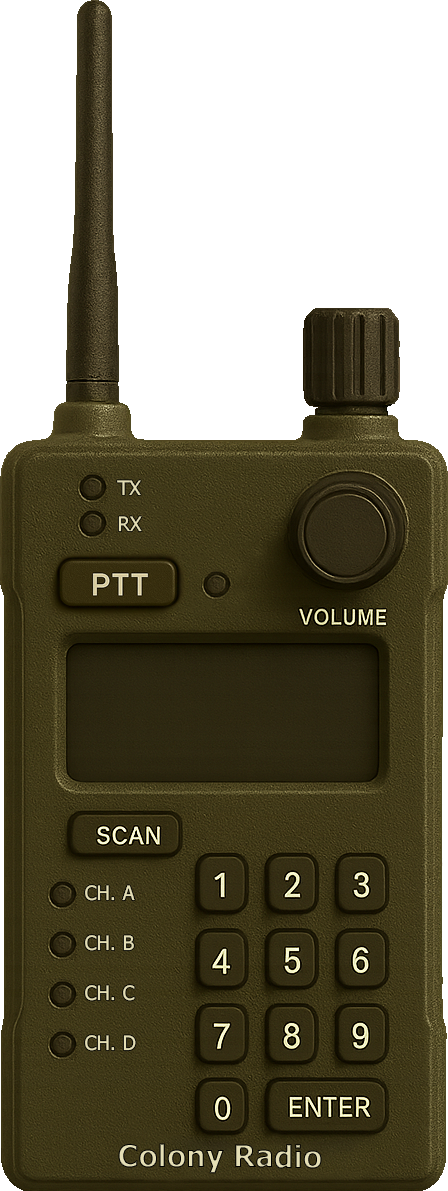
Planned browser-based emulator scaffold for demonstrating client behavior, channel controls, status feedback, and radio-style interaction flows on the website.
Android proof of concept preserves the on-air protocol with UDP voice transport, Opus audio, AES-256-GCM encryption, channel selection, and push-to-talk input.
The client sends a structured registration payload instead of only opening a socket. That gives the server enough metadata to track client identity, supported protocol version, tuned channels, monitored channels, loopback state, and encryption readiness.
# udp_client.py
def _send_register(self) -> None:
    data = {
        "nick": self.nick,
        "net": self.net,
        "ssrc": self.ssrc,
        "protocol_version": int(PROTOCOL_VERSION),
        "min_protocol_version": int(PROTOCOL_MIN_VERSION),
        "client_version": self.client_version,
        "device_id": getattr(self, "device_id", None),
        "channels": self.channels,
        "monitor": self.monitor,
        "active_tx": self.active_tx,
    }
    data.update(self._keys_ready_payload())
    msg = pack_hdr(VER, MT_CTRL, self.seq.next(), now_ts48(), self.ssrc) + ctrl_hdr + b
self.sock.sendto(msg, self.server)The desktop client keeps a local mirror of the four radio channels, then normalizes and sends channel changes to the server as a dedicated channel-update control packet. Scan state is represented as monitored channels, which lets the server route audio for active and scanned frequencies.
# udp_client.py
self.channels = {
    "A": {"freq": 100.0, "mode": "PTT"},
    "B": {"freq": 101.0, "mode": "PTT"},
    "C": {"freq": 102.0, "mode": "PTT"},
    "D": {"freq": 111.1, "mode": "PTT"},
}
self.active_tx = "A"
self.monitor = {"A": True, "B": False, "C": False, "D": False}

payload_obj = {
    "active": int(active),
    "freqs": freqs_list,
    "scan": bool(any(sc)),
    "scan_channels": sc,
    "monitor_channels": sc,
}
ctrl_hdr = struct.pack("!BH", CTRL_CHAN_UPD, len(payload) & 0xFFFF)Audio is intentionally gated by push-to-talk before encoding. The transport prefers Opus for voice, falls back to PCM16 when Opus is unavailable, and can wrap the payload with AES-GCM when the selected network requires encrypted audio.
# udp_client.py
def send_audio(self, pcm_float32) -> None:
    if not self._ptt:
        return

    data = self.enc.encode_float32(buf) if self.enc.enabled else b""
    if not data:
        pcm16 = (buf * 32767.0).astype("<i2")
        data = pcm16.tobytes()
        flags |= AUDIO_FLAG_CODEC_PCM | AUDIO_FLAG_PCM_I16

    if self._audio_require_encrypt:
        key_id, key_bytes = self._select_tx_key()
        nonce = os.urandom(_AUDIO_NONCE_LEN)
        ciphertext = crypto.encrypt(nonce, data, _audio_aad(self.ssrc, seq_num))
data = struct.pack("!I", int(key_id) & 0xFFFFFFFF) + nonce + ciphertextThe client exposes link metrics from the UDP layer and receive-side mixer metrics from the jitter buffer. This makes connection quality visible in the UI and gives diagnostics enough data to explain audio gaps, packet loss, late frames, or queue buildup.
# udp_client.py
def get_link_metrics(self) -> dict:
    total = self._audio_rx_packets + self._audio_rx_est_lost
    loss_pct = (float(self._audio_rx_est_lost) / float(total) * 100.0) if total > 0 else 0.0
    return {
        "rtt_ms": self._rtt_ms,
        "packet_loss_est_pct": loss_pct,
        "late_frames": self._audio_rx_late,
        "tx_packets": self._audio_tx_packets,
        "active_key_net": self.active_key_net(),
    }

# app/rx_audio.py
def snapshot(self) -> dict:
    return {"queue_depth": int(total_depth), "late_frames": int(self._late_frames),
"active_channels": sorted(set(active_channels))}The message tab derives current and monitored frequencies, keeps subscription state synchronized with the server, and sends messages as frequency-scoped control payloads. Incoming chat can also feed the overlay toast system so radio messages appear outside the main window.
# app/app.py
udp.send_frequency_chat({
    "action": "sync",
    "frequencies": subs,
    "selected_frequency": selected_for_sync,
})

udp.send_frequency_chat({
    "action": "send",
    "frequency": freq,
    "text": text,
})

# udp_client.py
ctrl_hdr = struct.pack("!BH", CTRL_FREQ_CHAT, len(payload) & 0xFFFF)
msg = pack_hdr(VER, MT_CTRL, self.seq.next(), now_ts48(), self.ssrc) + ctrl_hdr + payloadSecurity and support tooling are part of the client instead of separate scripts. The client can request channel keys, verify signed update manifests before accepting server offers, and run admin-triggered diagnostics that report microphone levels, playback tests, and short link traces.
# udp_client.py
def send_key_request(self, payload_obj: dict) -> None:
    self._send_ctrl_json(CTRL_KEY_REQUEST, dict(payload_obj))

# app/app.py
ok, err, candidate_payload = verify_signed_update_manifest(signed_manifest, public_key)
if int(payload.get("protocol_version") or PROTOCOL_VERSION) < int(PROTOCOL_MIN_VERSION):
    return False, "protocol_too_old", payload

def _diagnostic_capture_trace(self, payload: dict) -> tuple[str, dict]:
    start = self._diagnostic_runtime_snapshot()
    time.sleep(duration_s)
    end = self._diagnostic_runtime_snapshot()
    details = {"rx_packets_delta": end_link.get("rx_packets", 0) - start_link.get("rx_packets", 0),
"packet_loss_est_pct": round(float(end_link.get("packet_loss_est_pct", 0.0)), 2)}The admin app owns the operator workflow. For local restarts it resolves a fresh launch command, starts a new admin/server pair, and keeps the server side hidden from the desktop.
cmd, cwd = self._resolve_admin_launch_command(auto_restart_server=True)
env = os.environ.copy()
env.setdefault("PYTHONUNBUFFERED", "1")
creationflags = int(getattr(subprocess, "CREATE_NO_WINDOW", 0))
subprocess.Popen(cmd, cwd=cwd, env=env, stdin=subprocess.DEVNULL,
                 stdout=subprocess.DEVNULL, stderr=subprocess.DEVNULL,
creationflags=creationflags)The server parses the compact control header, decodes JSON payloads where needed, and branches by protocol code for registration, channel updates, and other radio control traffic.
code, length = struct.unpack("!BH", payload[:3])
body = payload[3 : 3 + length] if len(payload) >= 3 + length else b""
self._log(f"[CTRL][RX] addr={addr} ssrc={ssrc} code={code} len={len(body)}")

if code == CTRL_REGISTER:
    info = _decode_json(body)
elif code == CTRL_CHAN_UPD:
# Apply channel/frequency updates from the client.The server embeds the web gateway in the same process and points it back to loopback UDP, so browser sessions register like radio clients without exposing an extra backend service.
gateway_udp_host = "127.0.0.1"
self.web_gateway = RadioWebGateway(
    WEB_GATEWAY_HOST,
    WEB_GATEWAY_PORT,
    gateway_udp_host,
    self.port,
)
self.web_gateway.start()Admin commands are wrapped in signed payloads. Update uploads also include a signed manifest with file size, SHA-256, app version, and protocol compatibility fields.
signed = build_signed_admin_control(
    private_key,
    int(code),
    body_obj,
    admin_id=f"{socket.gethostname()}:{os.getpid()}",
)
signed_manifest = build_signed_update_manifest(
    self._load_admin_signing_key(), name=name,
    size=len(data), sha256=sha256_hex(data),
    protocol_version=PROTOCOL_VERSION,
)Chat is normalized by frequency, held in bounded memory for active users, and inserted into SQLite so frequency history survives server restarts.
bucket = self._chat_history.get(freq)
if bucket is None:
    bucket = deque(maxlen=CHAT_HISTORY_LIMIT)
    self._chat_history[freq] = bucket
record = _normalize_chat_message_record(message, default_frequency=freq)
bucket.append(record)
if not self._chat_store.append_message(record):
    self._increment_counter("chat_store_errors")
INSERT OR REPLACE INTO messages
(id, frequency, ts, sender, sender_kind, sender_client_id,
sender_ssrc, text, attachment_json)
VALUES (?, ?, ?, ?, ?, ?, ?, ?, ?)Status snapshots combine server state with the embedded web gateway snapshot, so the admin UI can show uptime, connected rows, gateway clients, and recent operational activity.
def _web_gateway_snapshot(self) -> dict:
    gateway = getattr(self, "web_gateway", None)
    if gateway is None:
        return {"enabled": bool(WEB_GATEWAY_ENABLED), "running": False}
    return gateway.snapshot()

def _admin_status_payload(self, requester_addr=None) -> dict:
    uptime_s = max(0, int(time.time() - float(self._started_at)))
row_count = len(self.mgr.presence_snapshot())The browser emulator has been moved to its own page so the client application mock, radio overlay, and message overlay have more room. The current page explains the plan; the dedicated emulator page holds the scaffold.
Try RadioThe emulator is connected through a WebSocket bridge. Browser actions are sent as small JSON messages, and the gateway translates them into the UDP radio protocol.
function sendBridgeMessage(payload) {
  const socket = state.bridge.socket;
  if (!socket || socket.readyState !== WebSocket.OPEN) {
    return false;
  }
  socket.send(JSON.stringify(payload));
  return true;
}The server-side gateway keeps the browser contract explicit. It registers a web radio session, updates channels, forwards push-to-talk, and bridges browser PCM audio into radio packets.
if msg_type == "connect":
    await self.connect(message)
elif msg_type == "channels":
    self.update_channels(message)
    self.send_channel_update()
elif msg_type == "ptt":
    self.send_ctrl_json(CTRL_PTT, {"ptt": bool(message.get("active"))})
elif msg_type == "audio_pcm16":
    self.send_audio_pcm16(message)
flags = AUDIO_FLAG_PTT | AUDIO_FLAG_CODEC_PCM | AUDIO_FLAG_PCM_I16
body = struct.pack("!BH", flags, len(data) & 0xFFFF) + data
self.send_packet(pack_hdr(VER, MT_AUDIO, self.seq.next(),
now_ts48(), self.ssrc) + body)The page updates channel state immediately, pushes changes to the bridge, and requests microphone audio only while transmitting. Received PCM is decoded in the browser and played through the Web Audio API.
sendBridgeMessage({
  type: "audio_pcm16",
  sampleRate: state.audio.txSampleRate,
  data: bytesToBase64(floatSamplesToPcm16Bytes(frame)),
});
if (state.bridge.realMode) {
sendBridgeMessage({ type: "ptt", active: state.transmitting });
if (state.transmitting) {
startMicStream();
} else {
setMicTrackEnabled(false);
clearTransmitBuffer();
}
}The Android prototype preserves the same on-air protocol as the desktop client so it can communicate with the existing radio server.
Supports UDP control and audio packets, Opus 48 kHz mono voice audio, AES-256-GCM encryption with key IDs, basic A-D channel selection, and hold-to-talk push-to-talk input.
The current mobile version is a proof of concept, with known gaps around channel editing, in-app update handling, and background service behavior.
Radio Web Emulator
This is the dedicated scaffold for the future browser emulator. It separates the client application mock from the radio overlay mock so there is room to build controls, state, and interaction logic in later passes.
Connect to the radio server at 68.54.128.30 on port 8765, then allow microphone access when the browser asks.
Use CapsLock as the default push-to-talk key, or tap the radio overlay PTT button to toggle transmit on phones and tablets.
Channel A starts on 100.0 MHz and is the default place to chat. Any matching frequency can work if other users are tuned to it.
Public browser transmit needs HTTPS for microphone access and WSS for the radio gateway. A public HTTP link can load the page, but most browsers will block mic audio.
Use this tab to validate the current client pipeline: selected mic capture, live input tokens, local RX simulation, and server loopback.
Featured Work
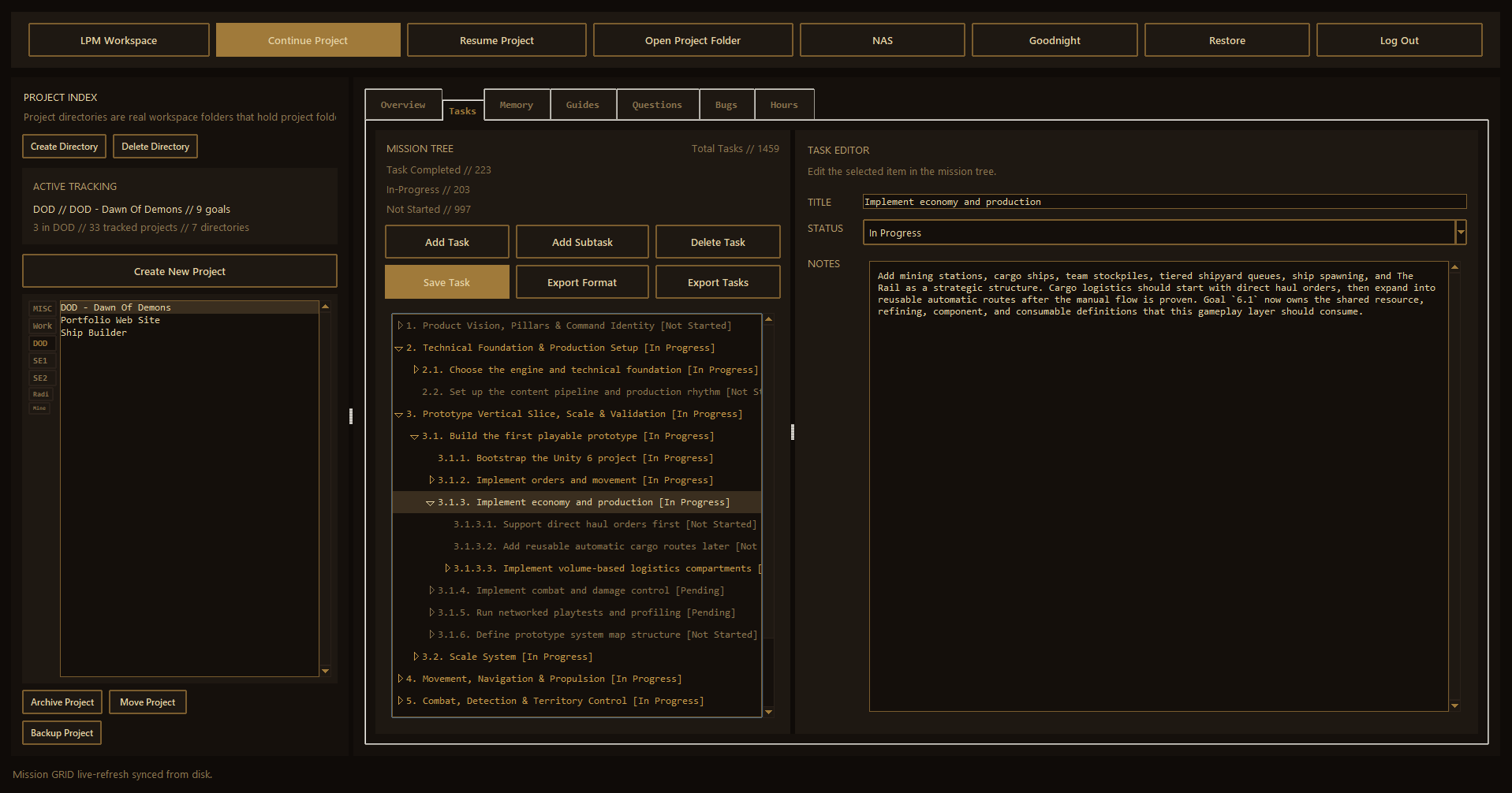
LPM, short for LeRoy's Project Manager, is a local workspace launcher and project record system built to keep long-running development work organized across many folders, tools, and repeatable work sessions.
Organizes work into directory buckets like DOD, Radio, SE1, SE2, Work, and MISC, with tools to create, move, archive, and open projects.
Maintains overview, memory, reusable guides, questions, bugs, task progress, and daily work logs for every active project.
Starts or resumes workspace and project-scoped work sessions with the right startup instructions and context files.
Includes Goodnight backup and Restore flows that package selected projects, upload to a NAS target, and keep logs for recovery.
Runs a lightweight backup server on a second computer with signed requests, optional HTTPS, device folders, and dated snapshot archives.
LPM is built around continuity. A project can be paused for days, reopened later, and still give the next work session a clear picture of what the project is, what has changed, what is blocked, and what should happen next.
LPM standardizes the Codex record folder so every project has the same memory, overview, guide, task, question, bug, and hours locations. The launcher writes JSON as the durable source and regenerates markdown for fast human review at session start.
def overview_json_file(project_dir: Path) -> Path:
    return project_codex_dir(project_dir) / "OVERVIEW.json"

def progress_json_file(project_dir: Path) -> Path:
    return project_codex_dir(project_dir) / "PROGRESS.json"

def questions_json_file(project_dir: Path) -> Path:
    return project_codex_dir(project_dir) / "QUESTIONS.json"

def hours_dir(project_dir: Path) -> Path:
    return project_codex_dir(project_dir) / "Hours"
def write_progress_files(project_dir: Path, data: dict[str, Any]) -> None:
progress_json_file(project_dir).write_text(json.dumps(data, indent=2) + "\n", encoding="utf-8")
progress_markdown_file(project_dir).write_text(render_progress_markdown(data), encoding="utf-8")LPM keeps task hierarchy in `PROGRESS.json` and renders the same structure into readable markdown. In the GUI, each task path is tracked in the tree so nested subgoals can be selected, edited, saved, exported, or continued in later work sessions.
def render_goal_bullets(subgoals: list[dict[str, Any]], prefix: str, depth: int) -> list[str]:
    lines = []
    indent = "  " * depth
    for index, goal in enumerate(subgoals, start=1):
        number_text = f"{prefix}.{index}"
        lines.append(f"{indent}- {number_text}. {goal.get('title') or 'Untitled Task'} [{goal.get('status') or 'Not Started'}]")
        nested = goal.get("subgoals") or []
        if nested:
            lines.extend(render_goal_bullets(nested, number_text, depth + 1))
def add_subgoal(self) -> None:
path = self.selected_goal_path()
parent_goal = self.goal_by_path(path)
subgoals = parent_goal.setdefault("subgoals", [])
subgoals.append(new_goal(title))
self.current_progress["last_updated"] = now_iso()
self.commit_progress(selected_path=path + (len(subgoals) - 1,))The launcher treats questions, bugs, and guides as first-class project records instead of loose notes. Questions keep status, answer, and notes fields; bugs keep a stable number plus resolution notes; guides keep repeatable steps and follow-up reminders.
def render_questions_markdown(data: dict[str, Any]) -> str:
    lines = [
        f"# {data.get('project_name') or 'Untitled Project'} Questions",
        "> This file is generated from `Codex\\QUESTIONS.json` by LPM - LeRoy's Project Manager.",
        "## Questions",
    ]
    for index, question in enumerate(data.get("questions") or [], start=1):
        lines.extend([
            f"### {index}. {summarize_question(question)}",
            f"- Status: {question.get('status') or QUESTION_STATUS_VALUES[0]}",
            "#### Answer",
            question.get("answer") or "Not answered yet.",
        ])
def render_guides_markdown(data: dict[str, Any]) -> str:
for index, guide in enumerate(data.get("guides") or [], start=1):
lines.extend([
f"### {index}. {summarize_guide(guide)}",
"#### Guide",
guide.get("guide") or "No guide steps recorded yet.",
"#### Notes",
guide.get("notes") or "No notes recorded yet.",
])Launcher-started sessions inherit the hours logger path. When work is completed, the helper appends a timestamped entry into `Codex\Hours\YYYY-MM-DD.json` and regenerates the matching markdown report that the Hours tab can display or export.
def write_day(project_dir: Path, data: dict[str, Any]) -> Path:
    hours_dir = project_dir / "Codex" / "Hours"
    hours_dir.mkdir(parents=True, exist_ok=True)
    json_path = hours_dir / f"{day}.json"
    markdown_path = hours_dir / f"{day}.md"
    json_path.write_text(json.dumps(data, indent=2) + "\n", encoding="utf-8")
    markdown_path.write_text(render_markdown(data), encoding="utf-8")
data.setdefault("entries", []).append({
"id": uuid4().hex,
"task": task,
"notes": args.notes.strip(),
"started_at": started_at,
"ended_at": ended_at,
"duration_minutes": args.duration_minutes.strip(),
})The launcher works against real project directories under the workspace root. It can start a broad LPM workspace session, start a fresh project-scoped session, or resume the last project session after persisting the current project state.
def launch_workspace_session(self) -> None:
    self.launch_codex(["new"])

def launch_project_session(self) -> None:
    if not self._persist_current_project("Continue project"):
        return
    self.launch_codex(["new", "--project", project_key(self.current_project_dir)])

def resume_project_session(self) -> None:
    if not self._persist_current_project("Resume project"):
        return
    self.launch_codex(["resume-last", "--project", project_key(self.current_project_dir)])
subprocess.Popen(
["cmd.exe", "/k", "call", str(LAUNCH_SCRIPT), *arguments],
cwd=str(WORKSPACE),
creationflags=creation_flags,
)The Goodnight flow validates NAS settings, writes a generated NAS client config, opens progress tracking, and runs the bundled NAS client in a worker process. Restore uses the same NAS settings to list devices, dated runs, directories, and project archives before pulling selected projects back into the workspace.
def goodnight_backup(self) -> None:
    if self.goodnight_backup_running:
        self.status_var.set("Goodnight backup is already running.")
        return
    if self.restore_running:
        self.status_var.set("Restore is already running. Wait for it to finish before starting Goodnight.")
        return
    config_data = self._build_goodnight_backup_config()
    validation_error = self._validate_goodnight_backup_config(config_data)
process = subprocess.Popen(
[sys.executable, "-m", "lpm_nas.client",
"--config", str(NAS_CLIENT_CONFIG_FILE),
"--log-file", str(client_log_path),
"backup-workspace"],
cwd=str(CODEX_DIR),
stdout=subprocess.PIPE,
stderr=subprocess.STDOUT,
)The NAS server is a companion deployment for LPM that runs on a second computer or backup machine. The Project Manager workstation sends selected projects through the bundled NAS client, while the NAS server stores dated snapshots and exposes restore listings back to the launcher.
The NAS service runs on the backup PC and writes project archives under a configured storage folder. Each workstation has its own device folder, and every Goodnight run creates a dated snapshot folder such as `2026-04-23` or `2026-04-23_2`.
def create_backup_run_folder(self, device_name: str | None = None) -> str:
    run_root = self.storage_root if not device_name else self.storage_root / safe_device_name(device_name)
    run_root.mkdir(parents=True, exist_ok=True)
    base_name = datetime.now().strftime("%Y-%m-%d")
    run_name = base_name
    suffix = 2
    while (run_root / run_name).exists():
        run_name = f"{base_name}_{suffix}"
        suffix += 1
    (run_root / run_name).mkdir(parents=True, exist_ok=False)
    return run_name
def list_backup_devices(self) -> list[dict[str, Any]]:
for child in self.storage_root.iterdir():
if not child.is_dir():
continue
if not any(grandchild.is_dir() and is_backup_run_name(grandchild.name) for grandchild in child.iterdir()):
continue
devices.append({"name": child.name, "modified_time": int(child.stat().st_mtime)})Deployment can be done directly with the Python module or through the desktop NAS server app. The server accepts host, port, storage root, shared secret, and optional certificate/key files. HTTPS is used when both certificate and key paths are configured.
def resolve_server_settings(args: argparse.Namespace) -> dict[str, Any]:
    config = load_config(args.config)
    host = require_string(coalesce_value(args.host, config.get("host"), "0.0.0.0"), "host")
    port = int(coalesce_value(args.port, config.get("port"), 8785))
    storage_root = require_string(coalesce_value(args.storage_root, config.get("storage_root")), "storage_root")
    shared_secret = require_string(coalesce_value(args.token, config.get("shared_secret") or config.get("token")), "token")
    cert_file = str(coalesce_value(args.cert_file, config.get("cert_file"), "") or "").strip()
    key_file = str(coalesce_value(args.key_file, config.get("key_file"), "") or "").strip()
if tls_enabled:
context = ssl.SSLContext(ssl.PROTOCOL_TLS_SERVER)
context.minimum_version = ssl.TLSVersion.TLSv1_2
context.load_cert_chain(certfile=normalized_cert, keyfile=normalized_key)
server.socket = context.wrap_socket(server.socket, server_side=True)The server rejects unsigned or stale requests before handling uploads or restore queries. Uploads are streamed to a temporary file, hashed while receiving, and only accepted when the received hash matches the signed digest.
valid, error_message = self.server.validate_auth(
    method=self.command,
    request_target=self.path,
    timestamp=timestamp,
    nonce=nonce,
    content_sha256=content_sha256,
    signature=signature,
)
if not valid:
    self.send_error(HTTPStatus.UNAUTHORIZED, error_message)
    return False
with temp_path.open("wb") as handle:
remaining = content_length
while remaining > 0:
chunk = self.rfile.read(min(1024 * 1024, remaining))
handle.write(chunk)
digest.update(chunk)
remaining -= len(chunk)
actual_sha256 = digest.hexdigest()
if actual_sha256 != declared_sha256:
self.send_error(HTTPStatus.BAD_REQUEST, "Uploaded file digest mismatch")Restore is built around discoverable server endpoints. The NAS server lists available devices, dated runs, workspace directories, and project ZIP archives, then streams the selected archive back as a normal ZIP download for restore into the active workspace.
if parsed.path == "/backup-devices":
    self._handle_backup_devices()
    return
if parsed.path == "/backup-runs":
    self._handle_backup_runs(parse_qs(parsed.query))
    return
if parsed.path == "/backup-archives":
    self._handle_backup_archives(parse_qs(parsed.query))
    return
if parsed.path == "/download-backup":
    self._handle_download_backup(parse_qs(parsed.query))
    return
self.send_response(HTTPStatus.OK)
self.send_header("Content-Type", "application/zip")
self.send_header("Content-Length", str(stat.st_size))
self.send_header("Content-Disposition", f'attachment; filename="{archive_path.name}"')
self.end_headers()
with archive_path.open("rb") as handle:
while True:
chunk = handle.read(1024 * 1024)
if not chunk:
break
self.wfile.write(chunk)Featured Work
Dawn of Demons is a multiplayer sci-fi RTS about commanding fleets, managing ship logistics, sustaining crews, and fighting across star systems where internal ship design directly affects battlefield survival.
Current Slice Video
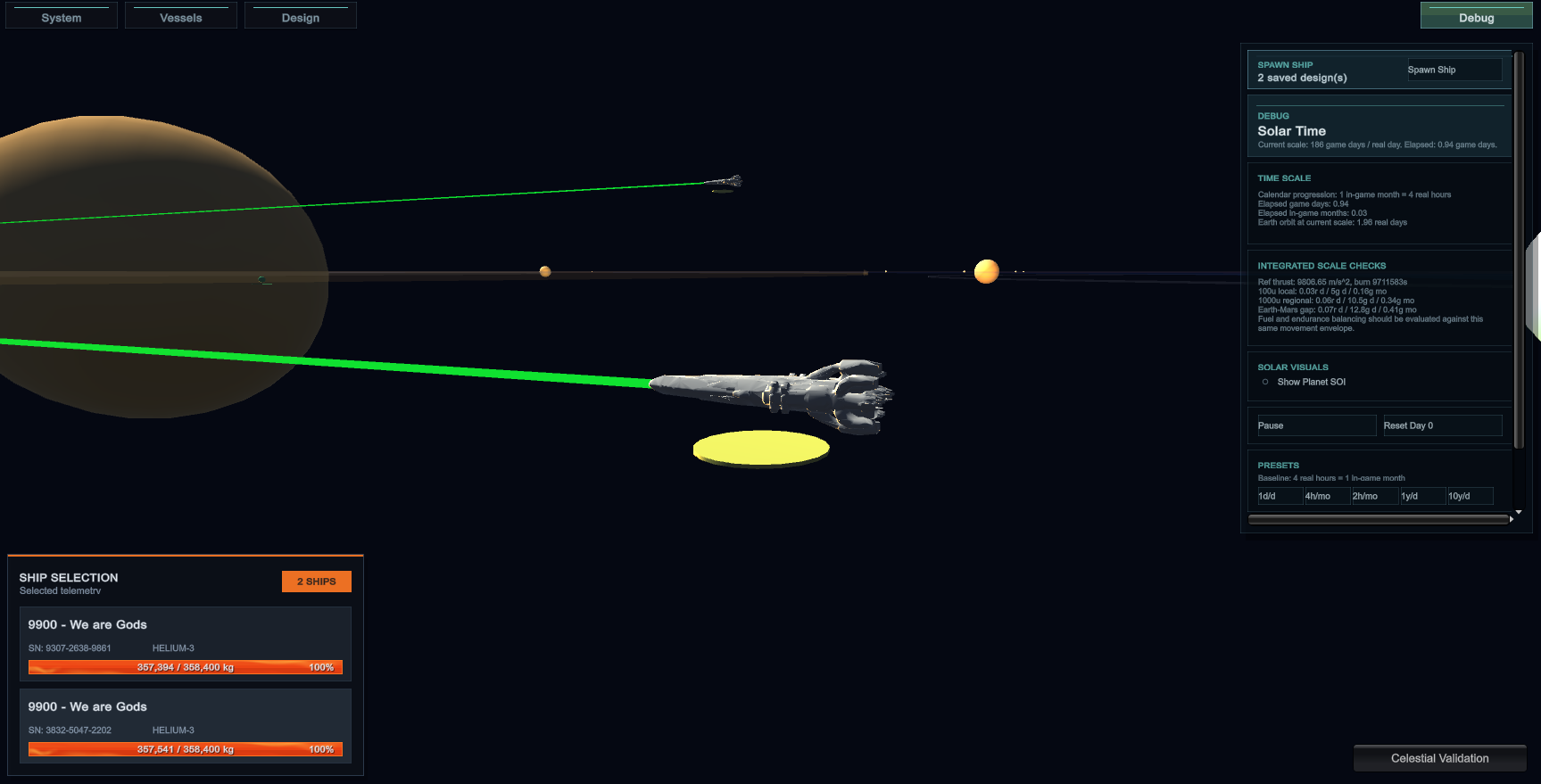
A video look at the current Dawn of Demons playable slice, showing the strategic ship scene, imported designs, faction tooling, inventory work, and live ship-system simulation.
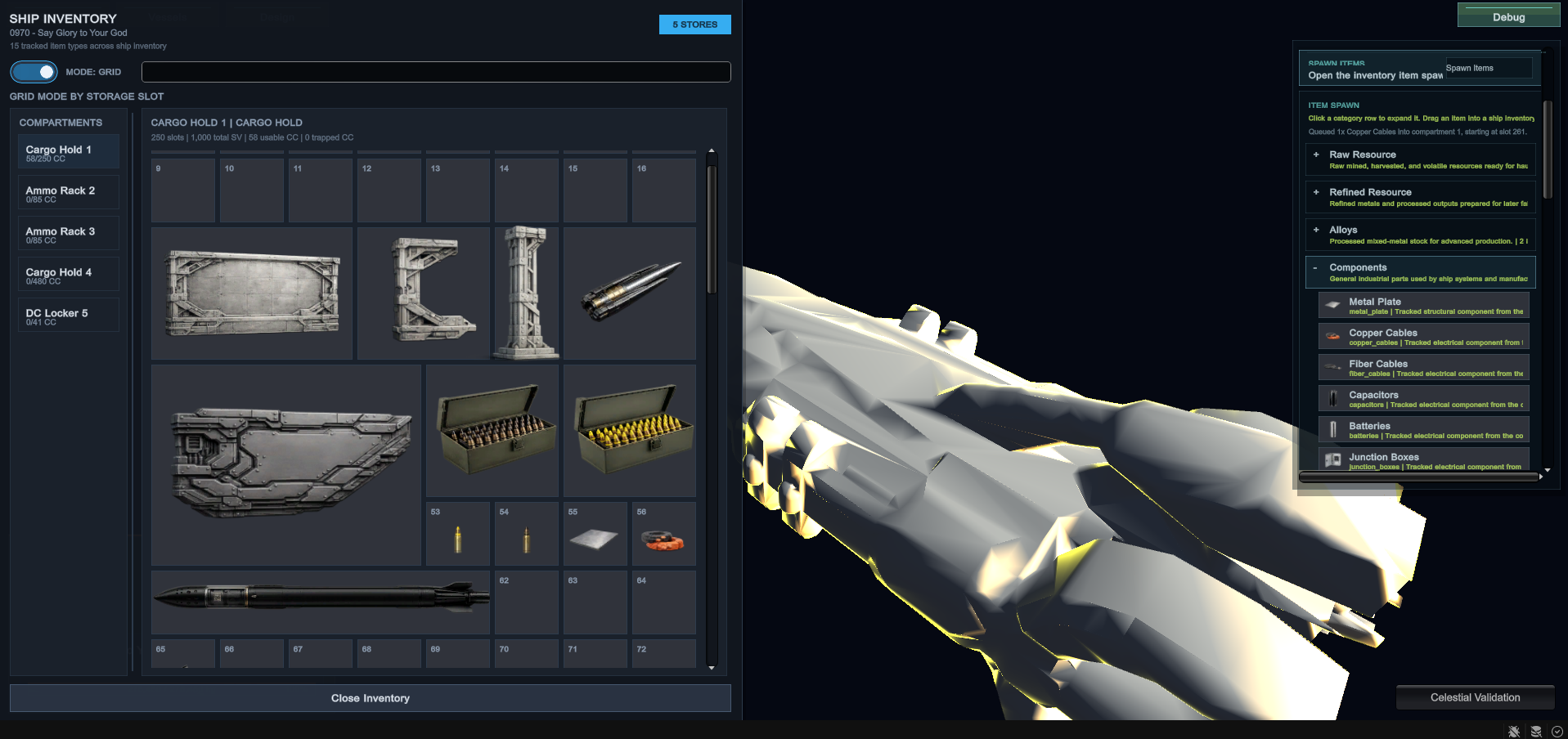
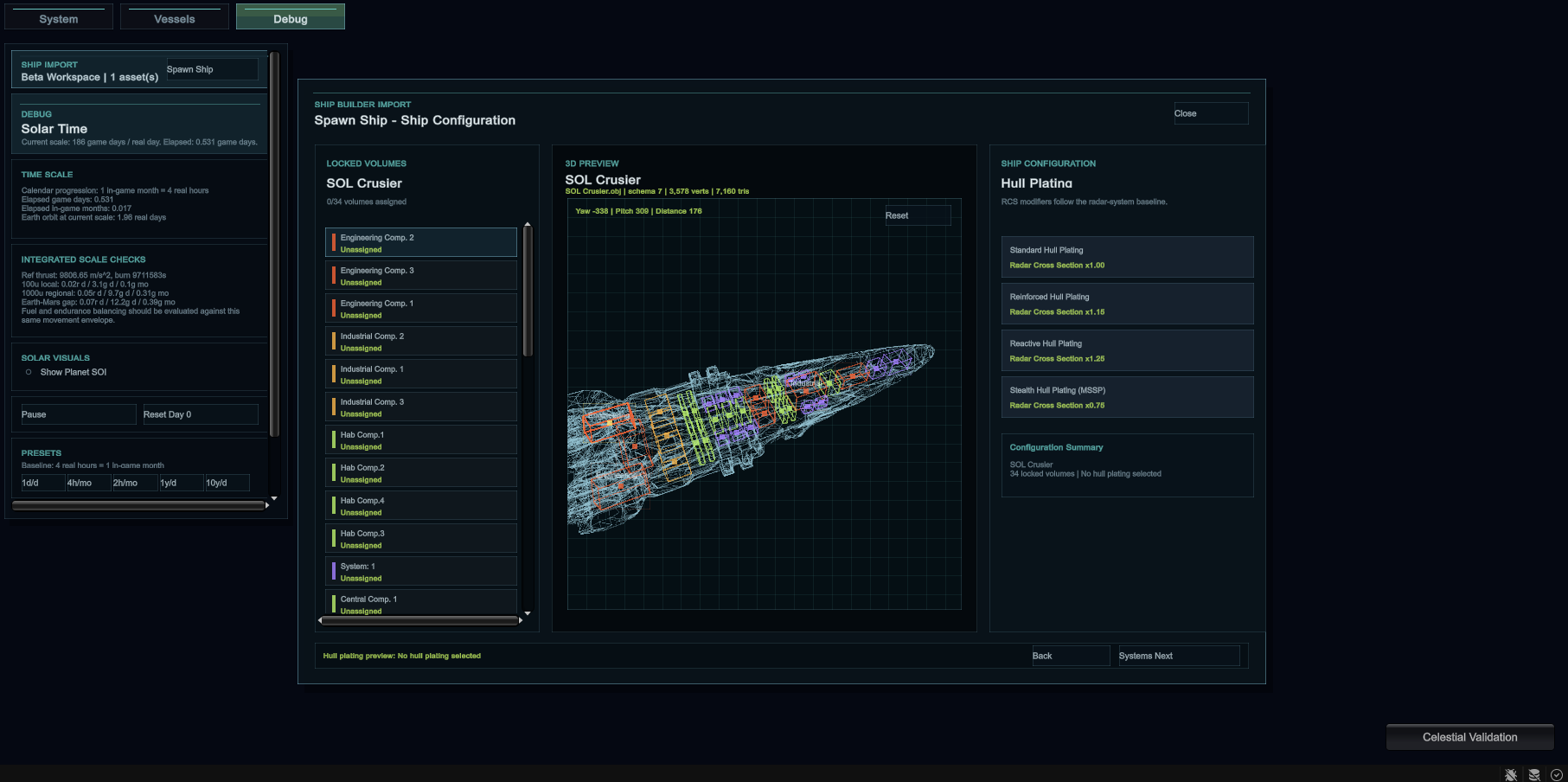
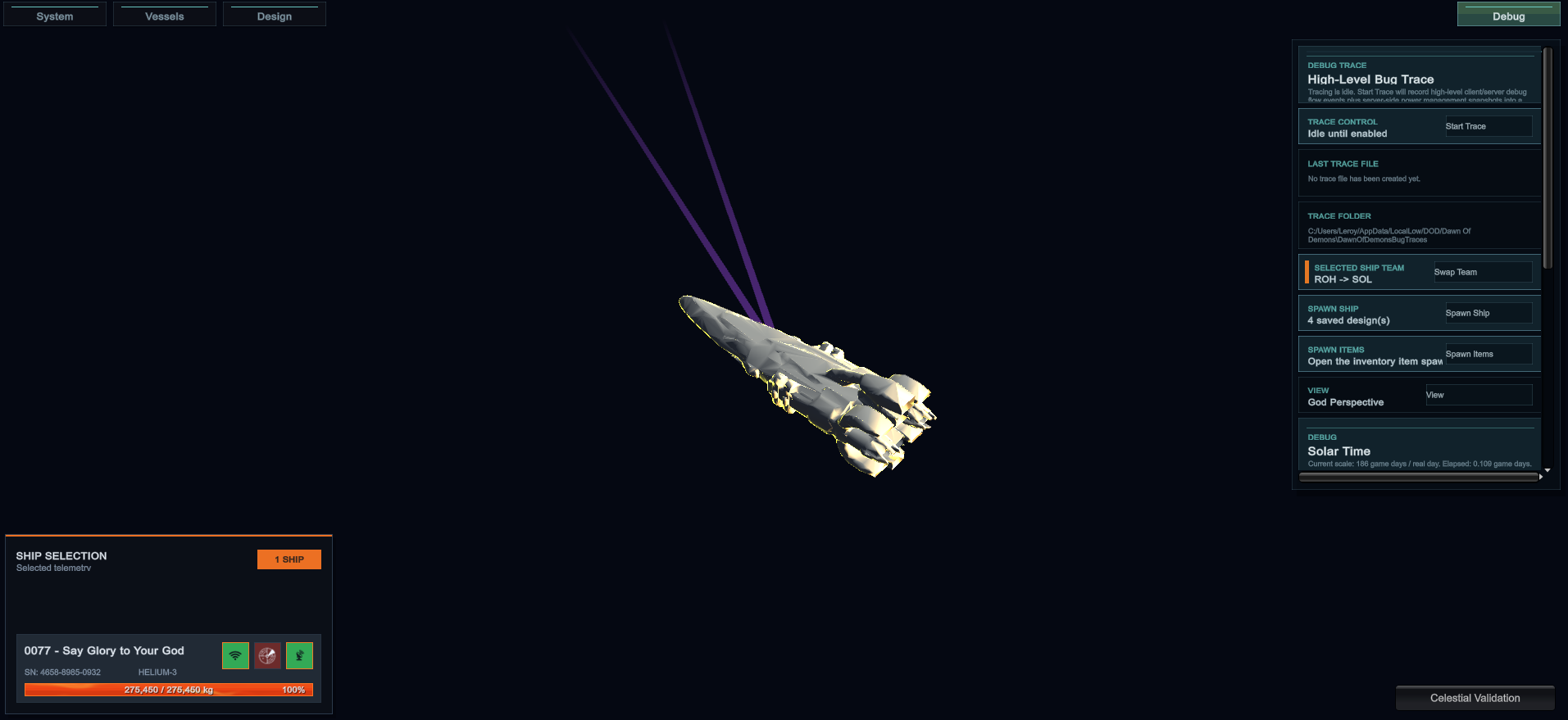
Players command ships at strategic scale, with selection panels, faction ownership, team visibility, and planned waypoint-based movement orders.
Ships expose fuel, reactor power, battery capacitors, radar, data link, life support, crew assignment, and compartment power state.
Cargo holds, ammo racks, hangars, fuel tanks, reactors, life support, and lockers use specialized inventory rules and storage capacities.
The prototype scope includes mining stations, cargo ships, team stockpiles, tiered shipyards, The Rail, and flagship destruction as a win condition.
Dawn of Demons is already past a static concept stage. The current Unity project contains a working strategic scene, imported ship assets, runtime ship data, interactive debug tooling, and a growing ship-management layer.
The current playable slice focuses on a strategic space view where ships can be selected, inspected, filtered, and tested in a large-scale solar environment. It is built as the command layer for fleet decisions rather than a close-range cockpit view.
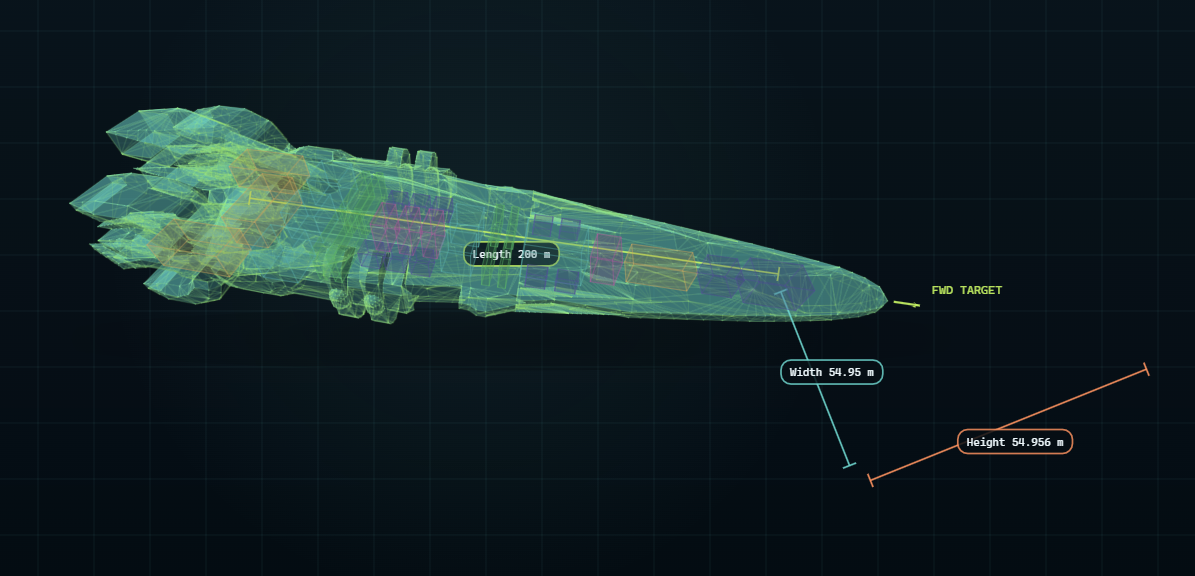
Dawn of Demons is built around authored ship designs becoming usable runtime objects. Imported ships carry gameplay data forward so a design is not just a model; it becomes a configured vessel with identity, class, mass, hull, and systems.
.shipasset imports carry tare weight and one-g burn rate through the importer, ship-definition UI, spawn request, and runtime flight-stat path.SOL ADMIN or ROH ADMIN.The design goal is that ship internals matter. Assigned volume drives practical capability instead of acting as decoration, so cargo, power, crew space, weapons support, and survivability all come from the physical plan of the ship.
The logistics layer is being built so ships need to be supplied, maintained, and managed. Inventory is not only a UI panel; it connects to ship endurance, ammunition availability, crew survival, and the larger RTS economy.
R, validated against compartment rules, and committed through authoritative server inventory state.Helium-3 Storage Tank items, and those cargo tanks can be input back into selected fuel tanks with capacity clamping.The game already separates ships by faction so the strategic layer can test visibility, team control, and perspective. SOL and ROH are the current faction anchors for fleet identity and future campaign/system planning.
Swap Team for fast test setup, flipping faction, team, and home-system assignment together.Dawn of Demons is being shaped around multiplayer from the start. The technical direction is a Unity dedicated-server RTS that can validate gameplay at small scale first, then grow toward larger fleet battles.
Source/DawnOfDemonsUnity and has been migrated from the SOL's Colony test-bed into the Dawn of Demons namespace and product identity.For over a decade, humanity has been locked in a brutal struggle between the ancient cradle of Sol and the distant frontier worlds of the Alicestine System. What began as political tension over resources, expansion, and independence slowly erupted into a devastating interstellar war that reshaped entire systems.
Though official peace now hangs by a thread, the scars of the conflict remain everywhere: shattered fleets drifting in forgotten orbits, militarized Rail gates standing watch over contested space, and generations raised knowing only war. To the people of Alicestine, Sol is a dying empire desperate to maintain control. To many within Sol, Alicestine is a rebellious frontier that grew too powerful to govern.
But peace is beginning to fail. Hidden within the fractured politics of Sol, extremist factions and rogue military groups have begun reigniting the conflict, launching attacks designed to drag both civilizations back into total war.
As tensions spiral across colonies, fleets, and border systems, the story follows soldiers, pilots, engineers, intelligence officers, civilians, and leaders on both sides of the divide, each struggling to survive a conflict far larger than themselves. Some fight for duty, some for revenge, some for survival, and others for the hope that humanity can still escape the cycle that has consumed it for generations.